Unreadable permissions waste time on every access request. An employee departure becomes a risk event when nobody knows exactly what the account can still reach. A clean structure is set up once, requires almost no upkeep, and answers the question "who has access to what" in a matter of seconds. This guide is for SMBs running on-premises Active Directory, whether inherited from a previous provider or being built from scratch. It goes from organizational units (OUs) down to NTFS permissions on file shares, through groups and naming conventions.
An OU tree organized by object type
The first mistake to avoid is mirroring the org chart in your OU structure. Sales becomes one OU, Purchasing becomes another, and the next reorganization forces you to move everything. Group Policies become impossible to follow, and delegations pile up with no plan.
An OU serves two purposes. Applying Group Policy (GPO) to a consistent set of objects. Delegating an administrative task to a person or group without giving them the keys to the entire domain.
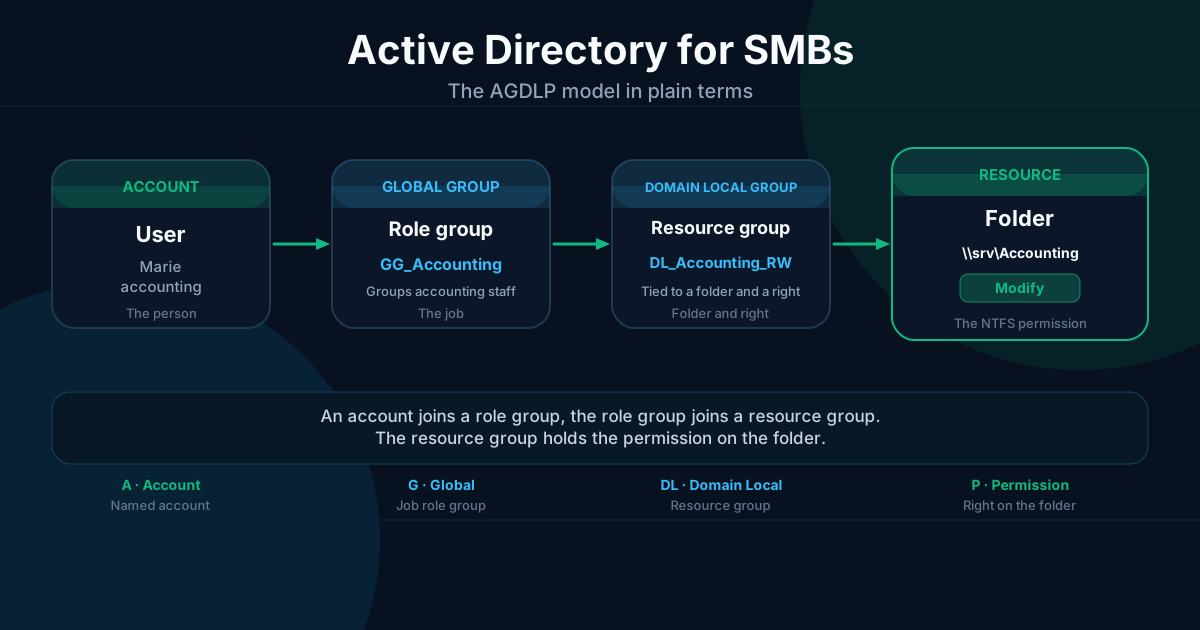
A clean OU tree for a single-domain SMB looks like this.
contoso.local
├── _OU_Users
├── _OU_Groups
├── _OU_Workstations
├── _OU_Servers
└── _OU_ServiceAccounts
Depending on size, split _OU_Users into sub-OUs when different GPOs apply to distinct populations, for example VIP accounts with a different screen-lock policy. Split _OU_Workstations when laptops need BitLocker GPOs that desktops do not.
The default containers (Computers, Users, Builtin) stay untouched. They do not accept GPOs and must not be used as operational storage. Every object created in production goes directly into a dedicated OU.
The _OU_ prefix on top-level OUs is optional but practical. In the console, it visually groups the OUs your team created and separates them from system containers.
The AGDLP model, groups that work for you
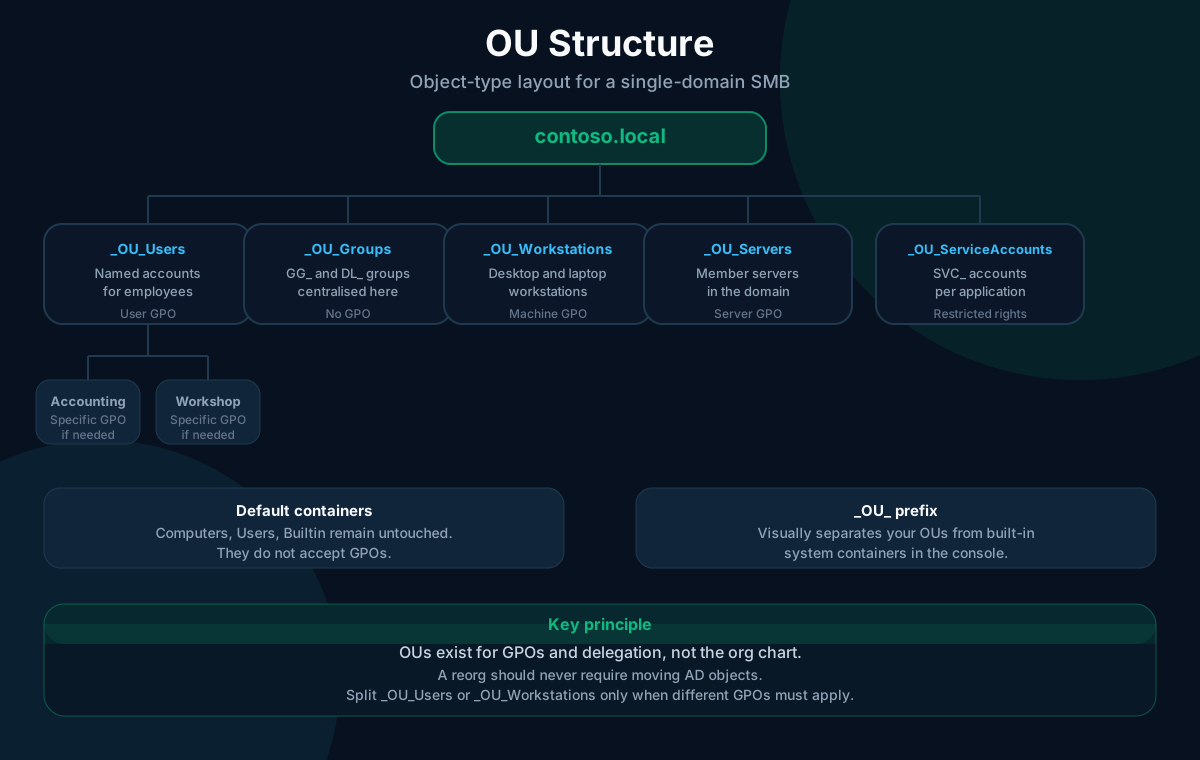
AGDLP stands for Account, Global, Domain Local, Permission. The formula describes a chain of indirection. A user account joins a global group. The global group joins a domain local group. The domain local group holds the permission on the resource.
In practice, this produces two types of groups with clearly separated roles.
The role group (global group, prefix GG_) reflects a job function or department. GG_Accounting, GG_Management, GG_Projects_Alpha. It describes who the people are, not what they can access.
The resource group (domain local group, prefix DL_) is tied to a folder and a permission level. DL_Accounting_RW grants write access to the Accounting folder, DL_Accounting_RO grants read-only. It describes what is accessible, with no reference to specific people.
The connection runs in one direction. The role group joins the resource group. The resource group joins the folder ACL. You never touch folder ACLs again except to add a new resource group. The model described here assumes a single domain, by far the most common setup in SMBs.
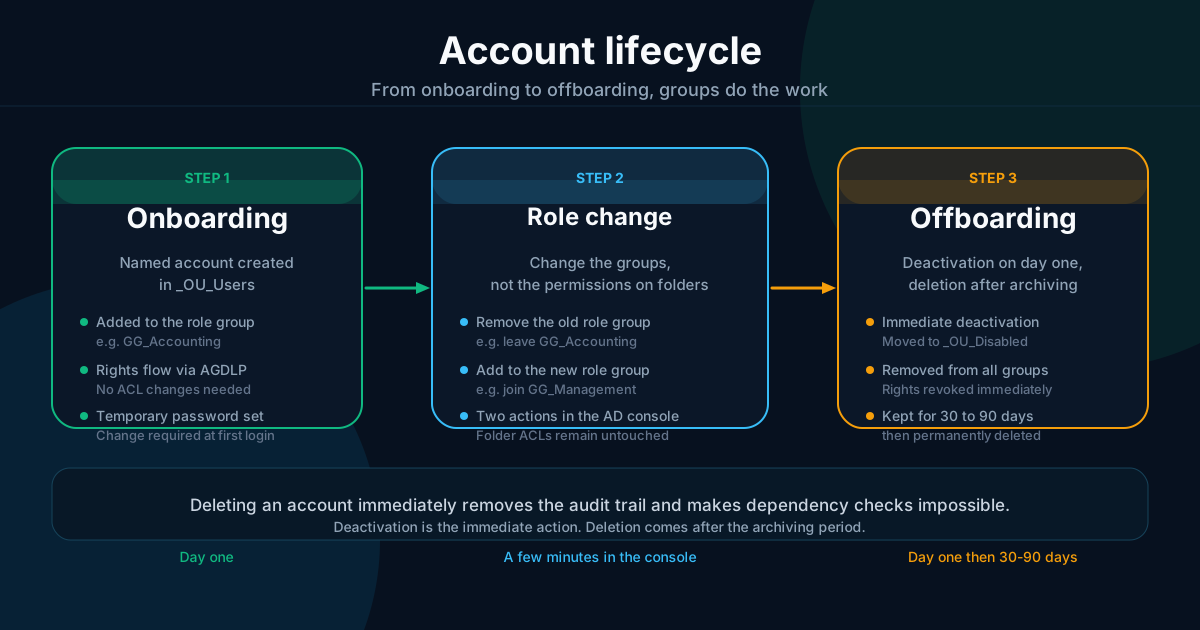
The concrete benefits show up from about fifteen employees onward. Onboarding means adding someone to one or two role groups. A role change takes two operations, remove from the old group and add to the new one. The question "who has write access to the Accounting folder" is answered by listing the members of DL_Accounting_RW, with no need to walk through folder ACLs one by one.
A network audit or a general review often turns up permissions that were set on the fly, directly on named accounts. These orphan permissions are invisible from the groups and survive employee departures.
For organizations with fewer than ten people, a simplified version works without the intermediate domain local group. The role group carries the permission directly on the folder. That shortcut is acceptable as long as you never assign a permission to a person rather than a group.
Applying the model to file shares
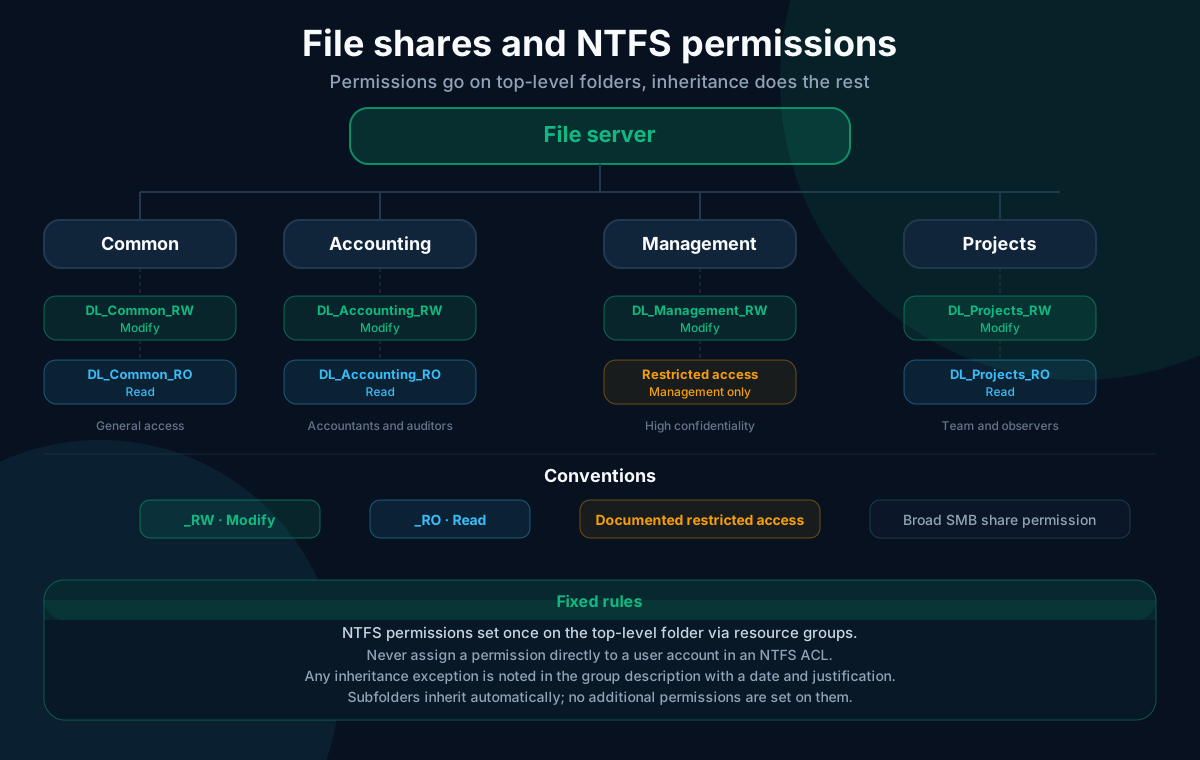
Top-level folders define the general structure of the share. Common, Accounting, Management, Projects, HR. Each top-level folder represents a coherent confidentiality boundary. Sub-folders below these top-level folders inherit permissions without any further intervention.
NTFS permissions are set once, on the top-level folder, through resource groups. No permissions are placed on sub-folders unless there is a documented reason. Each exception to inheritance is noted in the description of the relevant resource group, with the date and justification.
Share permissions and NTFS permissions serve two different purposes. The SMB share permission stays broad. Granting Change to Authenticated Users covers the vast majority of use cases. NTFS permissions do the fine-grained filtering. This separation simplifies troubleshooting. If a user cannot access a folder, the problem is in the NTFS groups, not in the share.
A few fixed rules.
- Never assign a permission directly to a user account in an NTFS ACL.
Everyonedoes not appear on any sensitive folder, even read-only.CREATOR_OWNERwith full control over sub-folders should be avoided unless the specific use case is documented.
With these rules, reading permissions stays fast. Opening the security properties of a top-level folder shows four to six entries, all groups prefixed with DL_, immediately readable.
Clean accounts
A healthy Active Directory runs on named accounts with no exceptions. No reception account, no scanner account, no intern account shared among several people. Every individual gets their own account, even for a three-week stay.
Admin accounts are separate from the everyday workstation account. A systems administrator has a standard account for daily use and an account suffixed -adm for administrative tasks. The -adm account has no mailbox, opens no interactive session on user workstations, and is used only to administer. This separation limits the exposure surface if a workstation is compromised.
Service accounts are dedicated per application. One account for backup, another for the antivirus, a third for the ERP. Each is documented in the AD description with the application name, creation date, and responsible owner. The password is long, random, and stored in a shared password manager. An employee departure where that person was the only one who knew a service account password is a preventable incident.
MFA should be enabled first on admin accounts and remote access, well before workstation accounts.
When an employee leaves, disable the account on day one, move it to an _OU_Disabled OU, and retain it for the period set by internal policy, typically thirty to ninety days, before deletion. Permissions and history remain visible during that window. Deleting immediately removes the audit trail and makes it impossible to verify that no folder depended on the account.
Naming conventions and hygiene
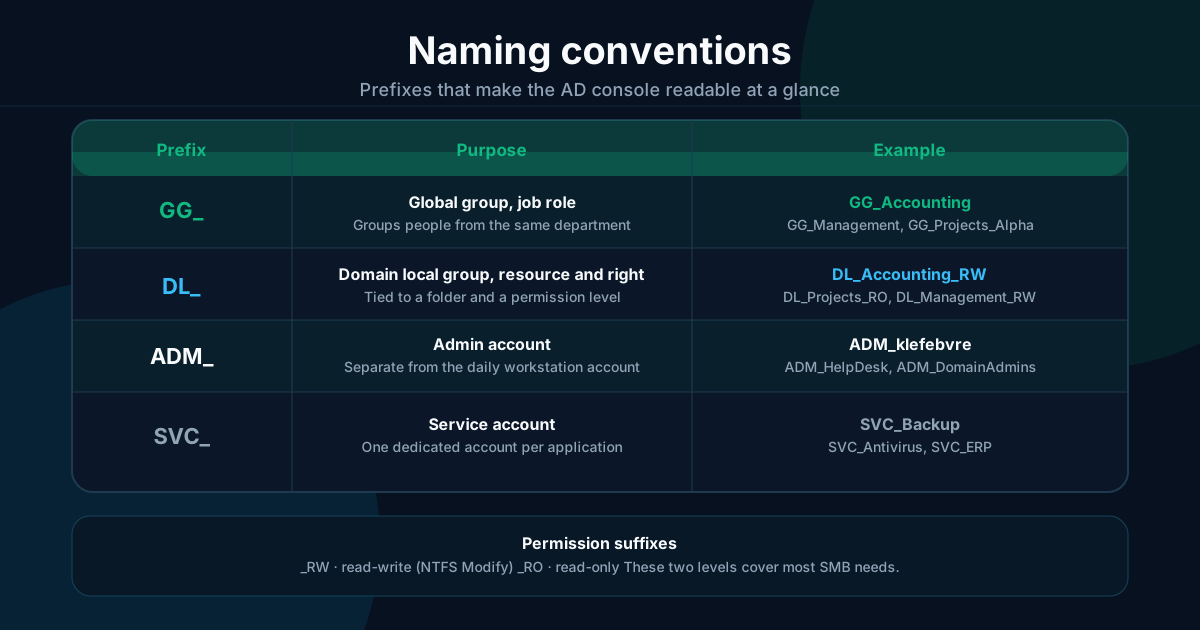
Consistent prefixes keep the AD console readable, even for someone who did not build the directory.
| Prefix | Group type | Example |
|---|---|---|
GG_ | Global group (role) | GG_Accounting, GG_Management |
DL_ | Domain local group (resource) | DL_Accounting_RW, DL_Projects_RO |
ADM_ | Administration group | ADM_HelpDesk, ADM_DomainAdmins |
SVC_ | Service account | SVC_Backup, SVC_Antivirus |
The _RW suffix means read-write (NTFS Modify right), _RO means read-only. These two levels cover almost every SMB use case.
The description field of each group is filled in at creation. Name of the requester, reason for the group, creation date. Three lines that save half an hour of investigation six months later.
Sensitive group membership is reviewed every six months. A spreadsheet with the members of each DL_ and ADM_ group, a business owner who confirms or removes. In an SMB, this review takes less than an hour. It regularly surfaces accounts left behind after a role change.
One page of internal documentation describes the model. Not a manual, one page. The OU names, the prefixes in use, the NTFS permission rule, the onboarding and offboarding process. That page prevents the next administrator from building their own logic on top of the existing one.
Mistakes that cost years to fix
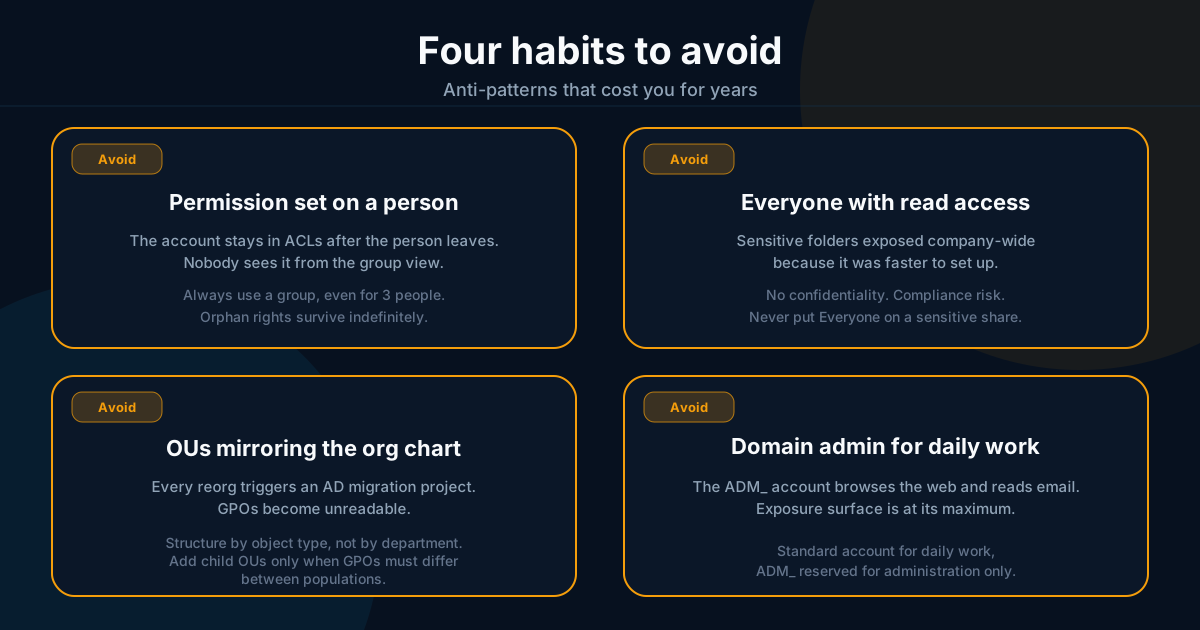
These are common, easy to avoid from the start, and expensive to correct once they have taken hold.
- NTFS permissions placed on individuals rather than groups. The account stays in the ACL after a departure and nobody sees it anymore.
Everyonewith read access on a sensitive share, because it was faster to configure.- OUs mirroring the org chart, forcing a migration project at every reorganization.
- Nested groups with no documented logic, where nobody can tell which nesting grants which right.
- The domain administrator account used daily to check email and browse the web.
Frequently asked questions
Is AGDLP overkill for 20 people?
The full chain (account, global group, domain local group, permission) pays off as soon as resources are spread across multiple servers. Below that threshold, the short form works. A role group GG_Accounting carries the Modify right directly on the Accounting folder. The key point does not change. Never assign a permission to a person. Even at twenty people, a named account in an ACL creates an invisible problem at every departure.
How many groups is too many?
The arithmetic stays small with a top-level-folder approach. Five top-level folders produce ten resource groups (_RW and _RO). Four departments produce four role groups. Add a handful of administration groups and you stay under thirty for a typical SMB. That list fits on one page of the console. One group per project or per sub-folder, by contrast, generates hundreds of entries and makes the whole thing unreadable within six months.
What about a hybrid setup with Entra ID?
The principles carry over. Groups remain the unit of permission management, whether they are synchronized from on-premises AD through Entra Connect or created natively in the cloud. Entra ID adds dynamic groups based on user attributes (available from Entra ID P1 onwards), which can automate membership for straightforward role moves. The role and resource group model stays the reference framework. The IT audit checklist covers the verification points useful before a hybrid migration.
Sources
Support available on this topic
Initial Infrastructures handles these topics for SMBs and mid-size companies. A short call is enough to identify priorities and the right scope of intervention.