A network audit is not a punishment. It is a way to take stock. The situations that trigger one tend to look alike. Recurring slowdowns nobody can explain, headcount that doubled in two years, an upcoming office move, or inheriting a network nobody has fully documented. In every one of these cases, nobody has a clear picture of what the network is actually doing.
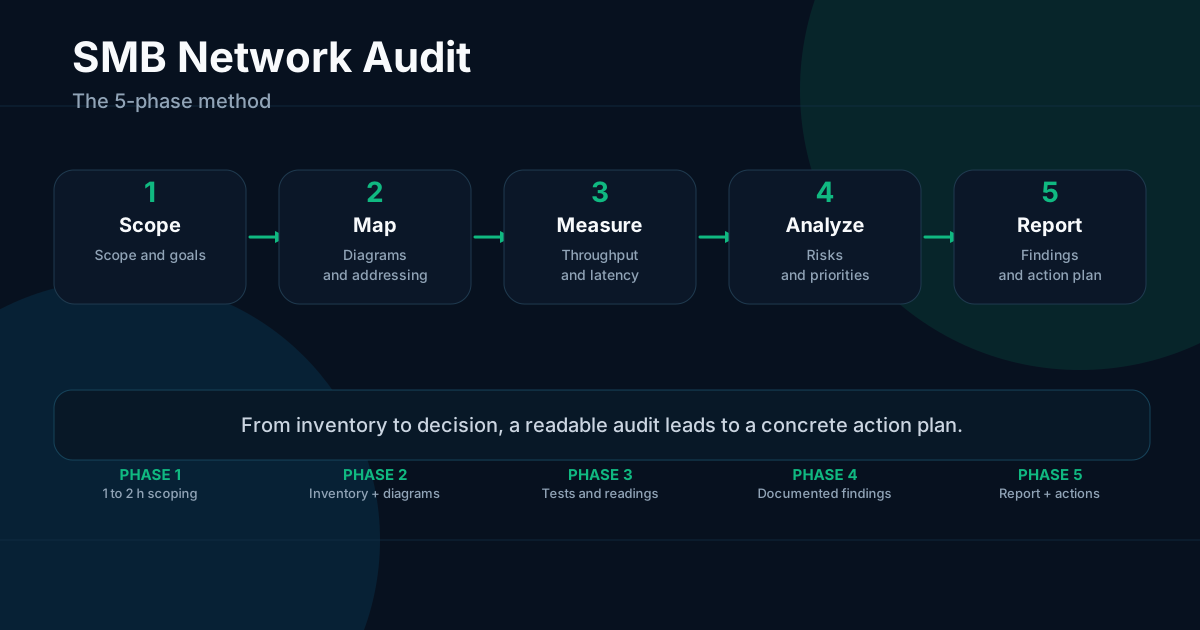
The audit exists to help you decide what to fix first, what to keep, and what to budget. The method described here has five phases. Scope, map, measure, analyze, then report. It works for a single-site SMB as well as for an organization with several locations.
Phase 1, scope the audit
Before touching a single cable or running a single tool, you need to define what you are trying to find out and on which part of the network.
Start with the scope. How many sites are covered? Are the ISP links included? Is Wi-Fi in or out? Active network equipment only, or also user workstations, printers, and IoT devices? A well-scoped audit takes two to five days of work. A poorly scoped one can drag on for two weeks without delivering much.
Then define the objectives. An audit can target reliability (identifying fragile points), performance (understanding why things are slow), security (verifying basic hygiene and segmentation), or project readiness (office move, VoIP deployment, cloud migration). The objective drives what you measure and what you document.
Then gather whatever already exists. Network diagrams even if outdated or partial, ISP contracts with guaranteed bandwidth figures, admin credentials for the equipment, and a list of recent helpdesk incidents. Everything that exists, even imperfect, is useful. What does not exist is useful too, since its absence is already a finding.
Before starting, talk to three or four users about their actual pain points. Not to collect complaints, but to direct measurements toward what genuinely disrupts work. A meeting room that drops video calls, a server that crawls on weekday mornings, a VPN that drops when working remotely. These signals help prioritize measurement points.
The deliverable for this phase is a one-page scope document recording the boundaries, objectives, known constraints, and available contacts.
Phase 2, map the network
Mapping answers a simple question. What is on this network, and how is it connected?
Start with an inventory of active equipment. For each router, firewall, switch, Wi-Fi access point, or network UPS unit, note the model, firmware version, estimated purchase date, and physical location. This list alone often turns up surprises, such as a switch purchased ten years ago still in production, firmware that has never been updated, or a device nobody can explain anymore.
Then build the physical diagram. What is plugged into what, on which port. Which cables connect which patch panel ports. Where the patch panels are located. This diagram does not need to be a work of art. It needs to be accurate and current.
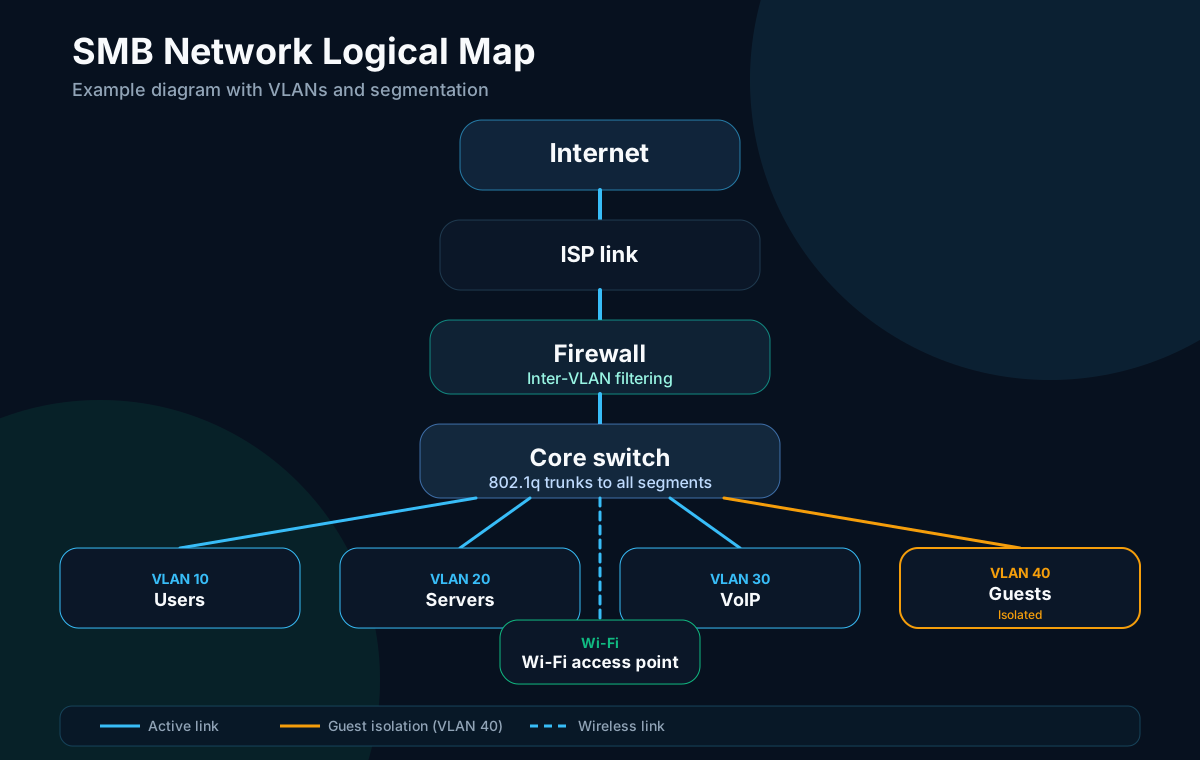
The logical diagram completes the physical view. Which VLANs exist, what they serve, how far they extend. The subnets, the address ranges. Routing between segments. To understand how packets flow, it helps to have a solid grasp of the OSI model. The separation between physical, logical, and application layers shapes how you diagnose problems.
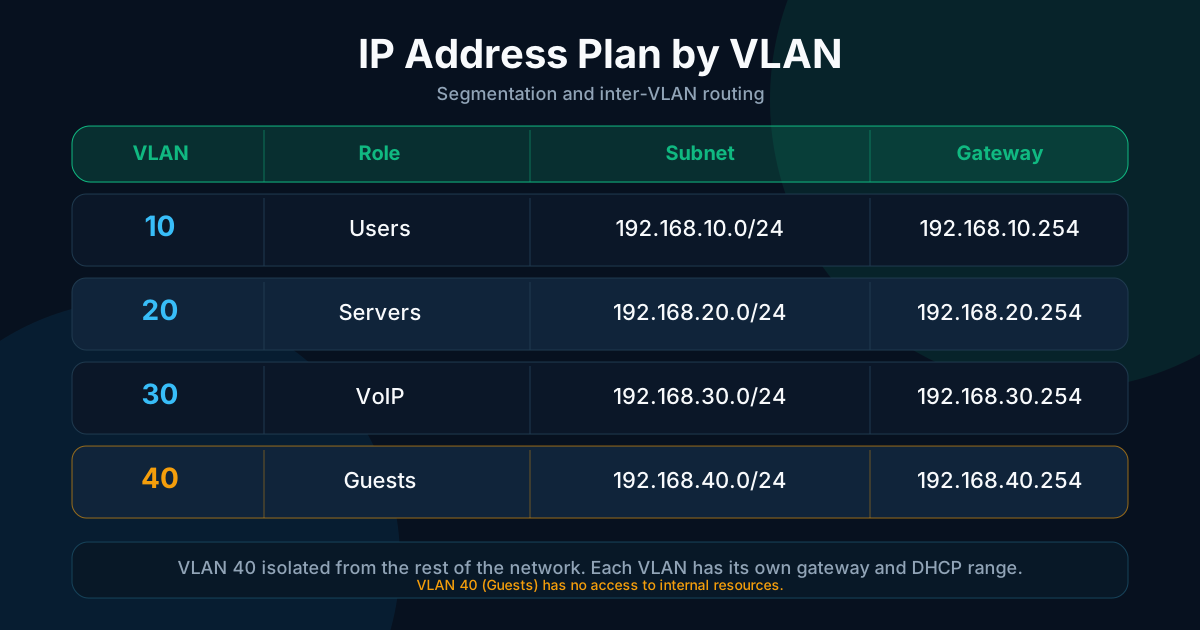
The IP address plan must be written down. Which subnet is assigned to users, servers, network equipment, and guests. With the gateway for each segment and its corresponding DHCP range. This document usually exists only in the heads of one or two people. The audit is the right time to put it in writing.
On the tooling side, a discovery scan with nmap helps confirm the inventory leaves nothing out, and a free tool like draw.io is enough to draw both diagrams.
The deliverable for this phase brings together an annotated physical diagram, a logical diagram with VLANs and subnets, and a written IP address plan.
Phase 3, measure what is actually happening
The map describes the structure. Measurements describe the behavior.
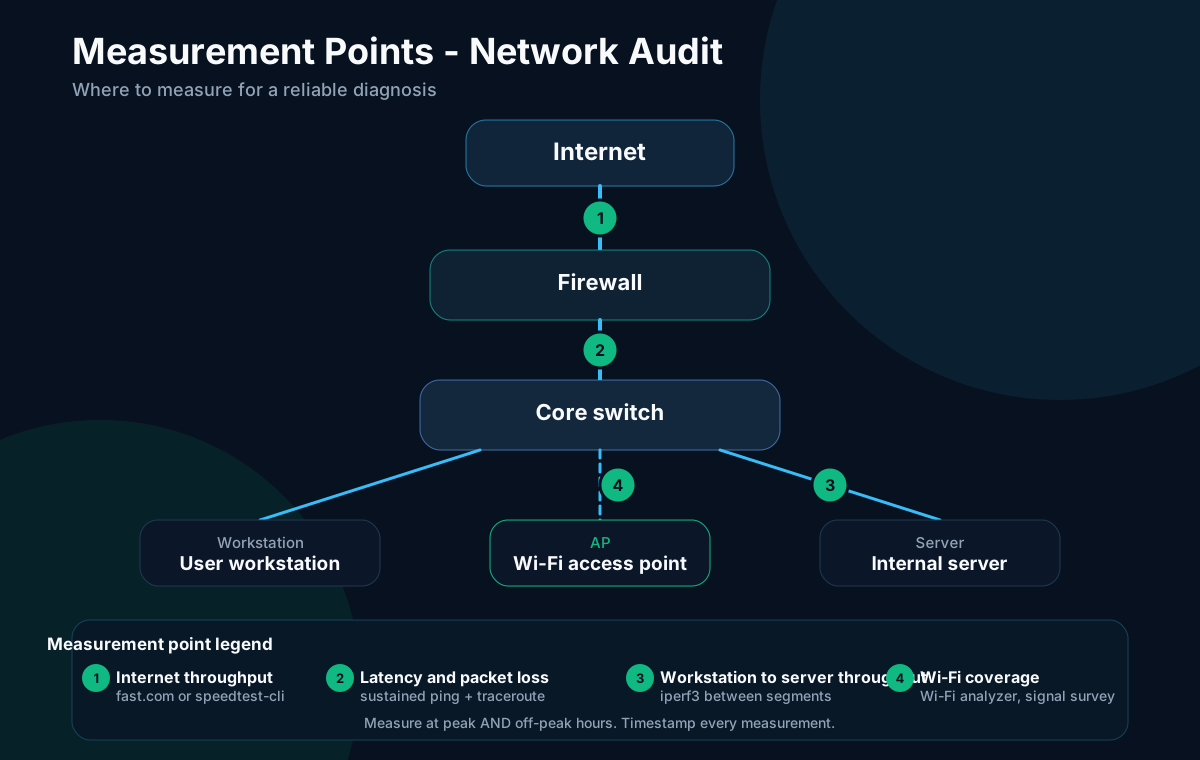
Start with actual throughput. Workstation-to-internet bandwidth with a simple test (fast.com, speedtest-cli), and workstation-to-server bandwidth with iperf3. To measure a segment, run iperf3 -s on the target machine, then iperf3 -c <target_IP> from the workstation being tested. The reported TCP throughput immediately shows whether the segment is saturated. The gap between the contracted bandwidth and the measured bandwidth feeds directly into your findings.
Latency and packet loss often tell you more than throughput. Run a sustained ping to the gateway, to internal servers, and to an external reference point. Use traceroute to identify where latency builds up. Packet loss above 0.1% on a wired internal link is already a signal worth investigating. On a Wi-Fi link, the acceptable threshold rises to 0.5 to 1% depending on the radio environment.
Link and device load is not visible to the naked eye. A switch running at 80% capacity during business hours shows no obvious symptoms. Neither does an ISP link saturated during peak hours. These measurements only make sense with timestamps.
Wi-Fi coverage, finally. A Wi-Fi analyzer on a smartphone or laptop shows signal strength, neighboring channels, interference, and overlap zones. A full site survey takes about an hour on a standard site and often changes how you read user complaints.
The most important rule for this phase is to measure during peak hours and off-peak hours, recording the conditions at each measurement. A network that holds at 9 a.m. can saturate at 10:30 a.m. That difference is a finding, not a measurement error.
For continuous monitoring beyond the one-time audit, a network monitoring tool such as LibreNMS lets you collect metrics over time without repeated manual effort.
The deliverable for this phase is a timestamped measurement table (throughput, latency, packet loss) by segment and time window, plus a Wi-Fi coverage survey.
Phase 4, analyze the findings
This phase correlates the map with the measurements to produce documented findings rather than opinions.
Segmentation is usually the first topic. A flat network with no VLANs, VLANs configured on switches but not extended to Wi-Fi, a guest network in the same segment as user workstations, admin interfaces accessible from any workstation. Poor segmentation hurts performance and makes the network harder to understand, on top of the security risk.
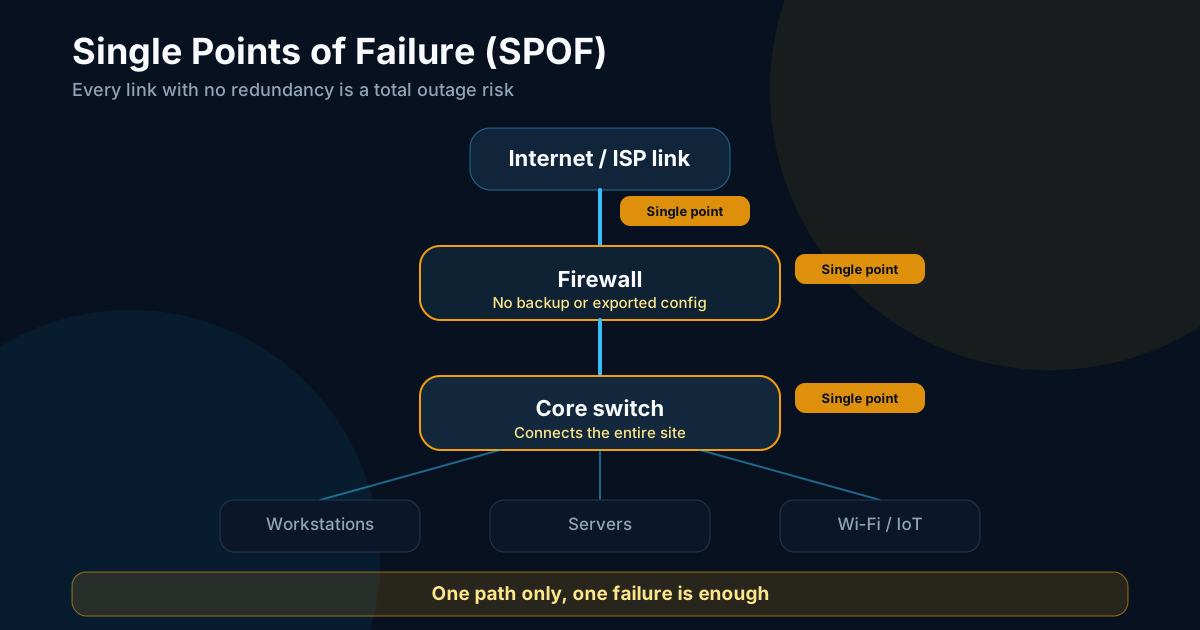
Single points of failure are the second axis. A single ISP link with no backup, a single core switch connecting the entire site, a firewall with no failover option and no exported configuration. Each of these is a risk of total outage. The audit must list them along with an estimated downtime in the event of a failure.
End-of-support equipment creates a double problem, the lack of security patches and the risk of a failure with no quick replacement path. A switch from 2011 or a firewall whose vendor support ended two years ago deserves an explicit call-out.
Basic security hygiene is often the fastest finding to document and the most useful to fix. Default admin passwords still in place, firmware never updated, firewall rules never reviewed since initial setup, no guest network or a poorly isolated one, admin interfaces accessible from user VLANs. Test admin interface access with the manufacturer default credentials. A successful login is an immediate finding. Fixing these points costs time and discipline, rarely money.
The article on business Wi-Fi covers the points specific to access points, SSID isolation, and coverage.
The deliverable for this phase is a list of findings categorized by theme (segmentation, single points of failure, end-of-support, security hygiene), each backed by a measurement or observation.
Phase 5, report and prioritize
A 60-page report with no clear priorities helps nobody. The report exists to drive decisions.
The report structure has three parts. A factual inventory describing what exists, what was measured, and under which conditions. Categorized findings, each backed by a measurement or evidence. Costed recommendations, with the order of work and an effort and cost estimate where possible.
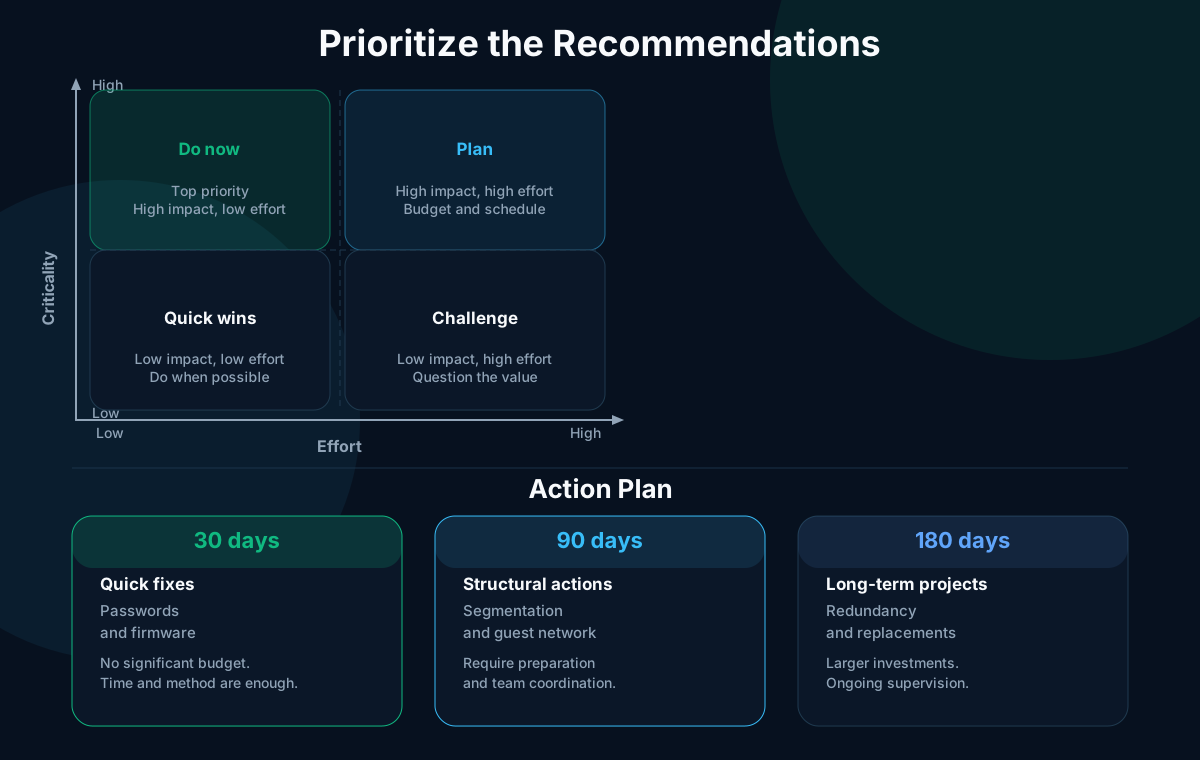
The criticality/effort matrix lets you rank recommendations on two axes, the impact if left unfixed on one side and the implementation difficulty on the other. High-criticality, low-effort actions come first. Low-criticality, high-effort actions wait or are dropped.
The action plan follows three time horizons.
- Within 30 days, quick fixes requiring no significant budget. Change default passwords, update critical firmware, verify configuration backups, export equipment configs.
- Within 90 days, structural changes that need some preparation. Deploy or fix VLAN segmentation, set up an isolated guest network, review firewall rules, replace the highest-priority end-of-support equipment.
- Within 180 days, longer or more expensive projects. ISP link redundancy, replacement of aging equipment, deployment of continuous monitoring.
The deliverable for this phase is a three-part report (inventory, findings, costed recommendations) along with a 30, 90, and 180-day action plan.
Mistakes that cost time
Avoiding them at the scoping stage changes the outcome.
- Auditing without a defined scope. You end up looking at everything without going deep on anything, and the deliverable is vague.
- Measuring only once, outside peak hours. Performance problems are often invisible at 8 a.m.
- Producing a report without priorities. A list of findings with no ranking leaves the client unable to decide.
- Ignoring Wi-Fi. Half of user complaints come from wireless. Treating it as secondary skews the analysis.
- Not verifying admin access before starting. Discovering mid-phase 3 that you don't have passwords for two switches delays everything.
Frequently asked questions
How long does a network audit take?
For a single-site SMB with fewer than 50 active devices, plan on two to five working days spread over two weeks. The first week covers scoping, mapping, and measurements. The second week is for analysis and writing the report. Multiple sites or larger fleets add time proportionally.
How often should you audit?
Every two to three years in a stable situation. Before any major project, such as an office move, a period of rapid growth, a cloud migration, a VoIP deployment, or a merger. After a serious incident that revealed an undocumented weakness.
Can you do it yourself?
Phases 1 to 3 (scoping, mapping, measurements) are within reach of a motivated IT manager with time available. The tooling is free or low-cost. Phase 4 (analysis) and phase 5 (reporting with prioritization) benefit from outside support, especially for security findings and building the action plan. The IT audit checklist helps structure the process; an outside engagement helps validate the security findings. An external perspective helps distinguish what is still acceptable from what no longer is.
Sources
Support available on this topic
Initial Infrastructures handles these topics for SMBs and mid-size companies. A short call is enough to identify priorities and the right scope of intervention.